top of page
Basic Modeling and Design
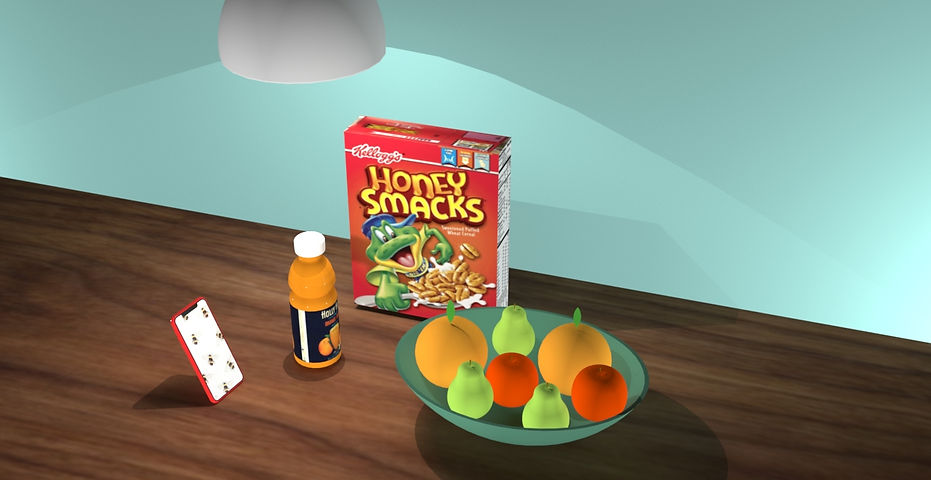
For this still life assignment in 3DS Max, we were practicing using multi/sub-object materials, images as materials, UVW map modifiers, and lighting to create a still life. To do this, I used models from past assignments and created some basic fruit shapes in Inventor. The phone was provided and had material ID's already set.


To the left are the fruit models I made in Inventor to go in my still life. I also made an orange but I did it in 3DS Max since it was just a sphere plus a leaf I made in Inventor. Once I imported these models to 3DS Max, I added colors to them, put them in my bowl, and positioned the stems where they belonged on the fruit.


.jpg)
One of the goals of this assignment was to create a scene using simple geometry. The majority of the items in the scene are boxes. The table top is a rectangle with a wood grain image applied to it, the background is another box that is a solid color, and the cereal box is a rectangle with the images above applied to each side.


Additionally, we were encouraged to make use of past assignments in our scene. The orange juice was made in 3DS Max using a revolve, which I broke into sections to set material ID's and color. This was also the first time we used a UVW map modifier to wrap the orange juice label around the cylindrical bottle.
bottom of page